
Docker sample
Try the sample Alloy Edge Docker stack
This optional sample includes a ROS 2 recorder. If you already have a recorder, set up the Alloy Edge binary to upload its recordings.
Open Mesh Storage → Devices → Add device → and select Docker. The setup flow provides the image commands and a Compose file with your provisioning key.
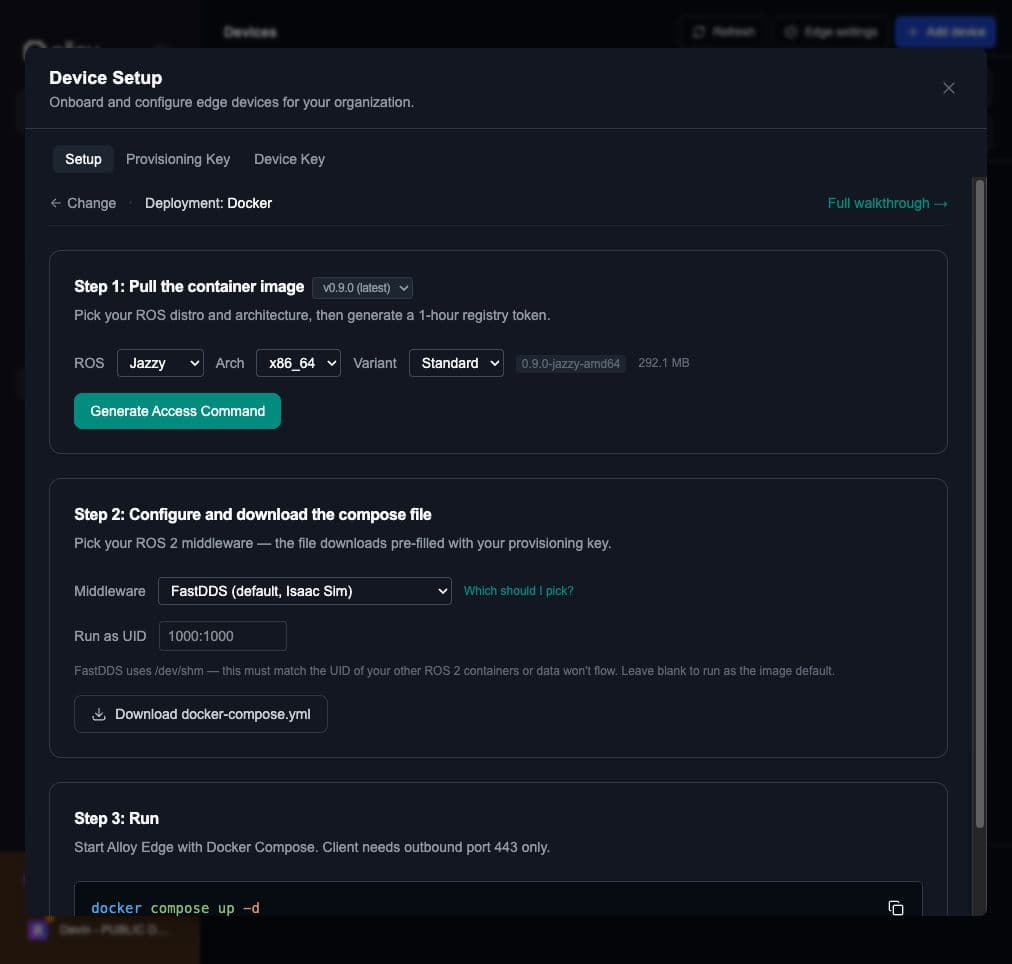
Step 1: Pull the image
Choose the ROS 2 distribution and architecture in Add device, then select Generate Access Command. Run the registry login and image pull commands shown there. The registry token expires after one hour.
Step 2: Configure and download the compose file
Choose a middleware in Download Compose File:
- FastDDS is the default and works with Isaac Sim. If Alloy Edge shares topics with other ROS 2 containers, set Run as UID to match their UID; otherwise, topics may appear without data flowing.
- CycloneDDS works with containers that use different UIDs or rootless Docker.
- Zenoh is an option for communication across networks.
Select Download docker-compose.yml. The file includes your provisioning key.
Step 3: Run and approve
From the directory containing the downloaded Compose file, run:
docker compose up -dIn Mesh Storage → Devices, approve the pending device. Alloy then issues it a device API key automatically. Check Last seen and Files on that page to confirm it is working.
The client needs outbound HTTPS access on port 443; it needs no inbound port.